

Telemedicine & Online Medical Consultation
Easy TeleMed
MyCLNQ serves as a one-stop-shop to taking care of you and your family’s healthcare needs smartly and digitally. Thanks to the built-in smart AI feature, quickly view the waiting times at various nearby clinics located in the neighbourhood and book your next medical appointment. You can also browse for the most appropriate and available doctor to seek medical attention from.
Telemedicine & Online Medical Consultation
Easy TeleMed
MyCLNQ serves as a one-stop-shop to taking care of you and your family’s healthcare needs smartly and digitally. Thanks to the built-in smart AI feature, quickly view the waiting times at various nearby clinics located in the neighbourhood and book your next medical appointment. You can also browse for the most appropriate and available doctor to seek medical attention from.

Online Video/Tele consultation
Connect with our healthcare experts to get expert diagnoses, medical advice, and treatment recommendations.
Medical Transport & Booking
From non-emergency transfers to hospital appointments, we provide reliable, safe, and timely transportation.

Medical Caregivers & Nurses
Find qualified nurses and caregivers who are trained to provide personalized care and support for your needs.

Doctor's Home Visit
Get quick access to qualified and compassionate doctors and physicians who will visit your home for checkups.
Home Medical Equipment
Support your healthcare needs with our wide selection of high-end home medical equipment and supplies.
MyCLNQ App specialities
-
Slot Selection
Book your preferred time slots and confirm the appointment.
-
Parallel Slots
Clinic admins can set up parallel appointment slots for emergency cases.
-
Locate Nearby Clinics
Search and book appointments for clinics that are located near your area.
-
AI Enabled
Suggestions of the GPs and specialist clinic choices within your neighbourhood
MyCLNQ App specilities
-
Slot Selection
Book your preferred time slots and confirm the appointment.
-
Parallel Slots
Clinic admins can set up parallel appointment slots for emergency cases.
-
Locate Nearby Clinics
Search and book appointments for clinics that are located near your area.
-
AI Enabled
Suggestions of the GPs and specialist clinic choices within your neighbourhood
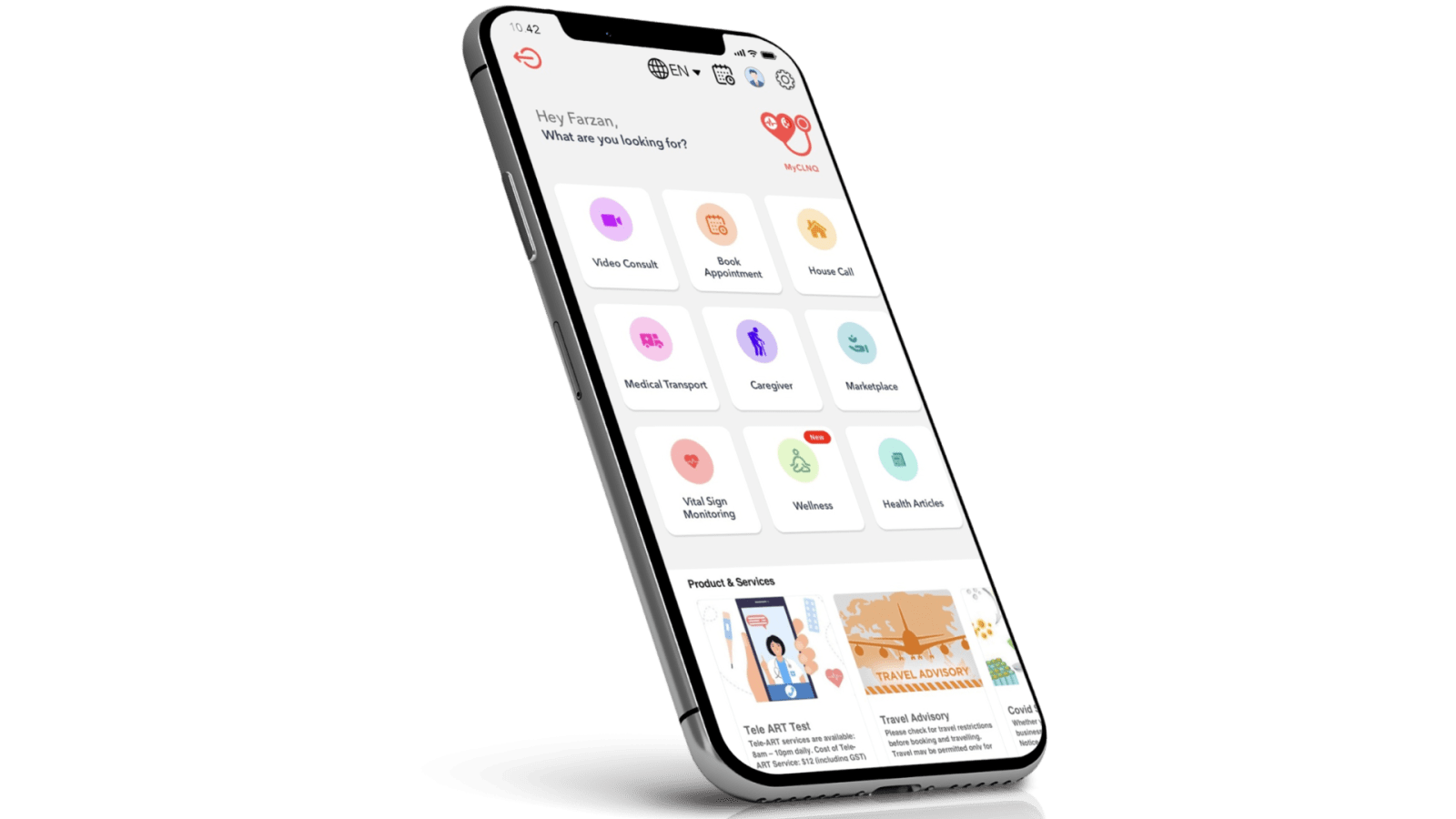
Features of MyCLNQ App
MyCLNQ is a comprehensive one-stop telehealth platform offering a range of online healthcare services, including:
-
Telemedicine
Connect with healthcare professionals for virtual consultation, diagnosis, and treatment recommendations. Enjoy convenience and quality medical care.
-
Artificial Intelligence
Our app utilizes AI to bring you intelligent data analysis, personalized health insights, and predictive modeling for an optimized experience.
-
Booking Therapists/Medical Transport/Caregivers
Book therapists, caregivers, and medical transport effortlessly through our app. Check availability and schedule services with ease within minutes.
-
Health Marketplace
Discover a comprehensive health marketplace and get access to a wide range of healthcare services, products, and resources to meet your needs.

Download the MyCLNQ App Now for Telehealth Services
MyCLNQ serves as a one-stop-shop to taking care of you and your family’s healthcare needs smartly and digitally. Thanks to the built-in smart AI feature, quickly view the waiting times at various nearby clinics located in the neighbourhood and book your next medical appointment. You can also browse for the most appropriate and available doctor to seek medical attention from.
Get the App



How to Use MyCLNQ App for Online Medical Consultation?
-
STEP 1: Register an account on the MyCLNQ App
Create an account on the MyCLNQ app using your Google, Apple, or email account. If MYCLNQ is your partner provider, do add your corporate plan card.
-
Step 2: Book a telehealth online medical consultation with one of our MyCLNQ doctors
Select a telehealth consultation type (Video, Tele-ART, House call), choose the speciality, choose a date and time, and select your preferred doctor.
-
Step 3: Booking caregivers, therapists and medical transport
After the telehealth online consultation, review your invoice in the app and confirm your payment.
-
Step 4: Wait for your medication to be delivered
You should have your verification ready to receive the medication that will be delivered to you within a few hours.
How to Use MyCLNQ App for Online Medical Consultation?
-
STEP 1: Register an account on the MyCLNQ App
Create an account on the MYCLNQ app using your Google, Apple, or email account. If MYCLNQ is your partner provider, do add your corporate plan card.
-
Step 2: Book a telehealth online medical consultation with one of our MyCLNQ doctors
Select a telehealth consultation type (Video, Tele-ART, House call), choose the speciality, choose a date and time, and select your preferred doctor.
-
Step 3: Booking caregivers, therapists and medical transport
After the telehealth online consultation, review your invoice in the app and confirm your payment.
-
Step 4: Wait for your medication to be delivered
You should have your verification ready to receive the medication that will be delivered to you within a few hours.
Frequently Asked Questions
Our telemedicine service brings healthcare to your fingertips. Connect with experienced doctors on call and receive diagnoses, medical advice, and treatment recommendations from professionals.